CVE-2026-41940 The Biggest cPanel Hack In History.

CVE-2026-41940 The Biggest cPanel Hack In History.

The CVE-2026-41940 cpanel Exploit

Table of Contents

▼▼▼▼▼

What Happened?

Was It Serious?

How DId It Happen?

Who Did It Effect?

How We Handled it

What You Should Do?

Going Forward

Final Thoughts

Need Hosting?

Join Orange Website today and host your site on infrastructure designed for stability, performance, and peace of mind.

What Happened With the Recent cPanel Security Vulnerability?

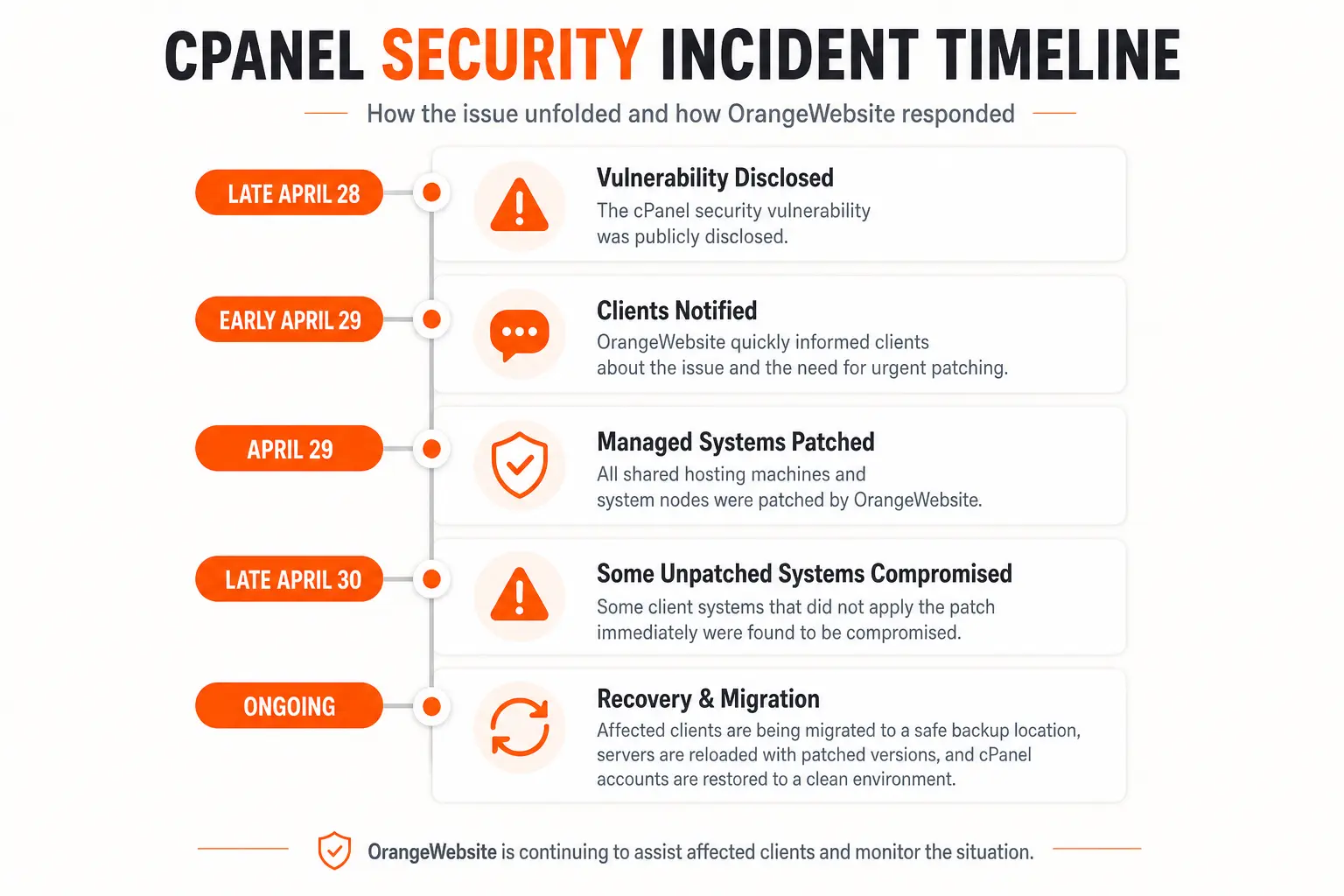
On April 28, 2026, cPanel released an important security update for cPanel & WHM and WP Squared after a serious vulnerability was discovered in the software. The vulnerability is now tracked as CVE-2026-41940 and has been widely reported as a critical authentication bypass issue affecting cPanel & WHM installations. cPanel confirmed that the issue affected cPanel software, including DNSOnly, on versions after 11.40.

Because cPanel and WHM are used across a large part of the web hosting industry, this quickly became a major concern for hosting providers, server administrators, and website owners. TechCrunch reported that attackers were actively exploiting the bug and that the issue could allow hackers to bypass the normal login process and gain access to the administration panel of affected systems.

At OrangeWebsite, we treated this as a high-priority security event from the moment it was disclosed. The vulnerability was disclosed late on April 28, and we announced it to our clients early on April 29. We also patched all shared hosting machines and system nodes as quickly as possible to protect customers on OrangeWebsite-managed infrastructure.

What Was the cPanel Vulnerability?

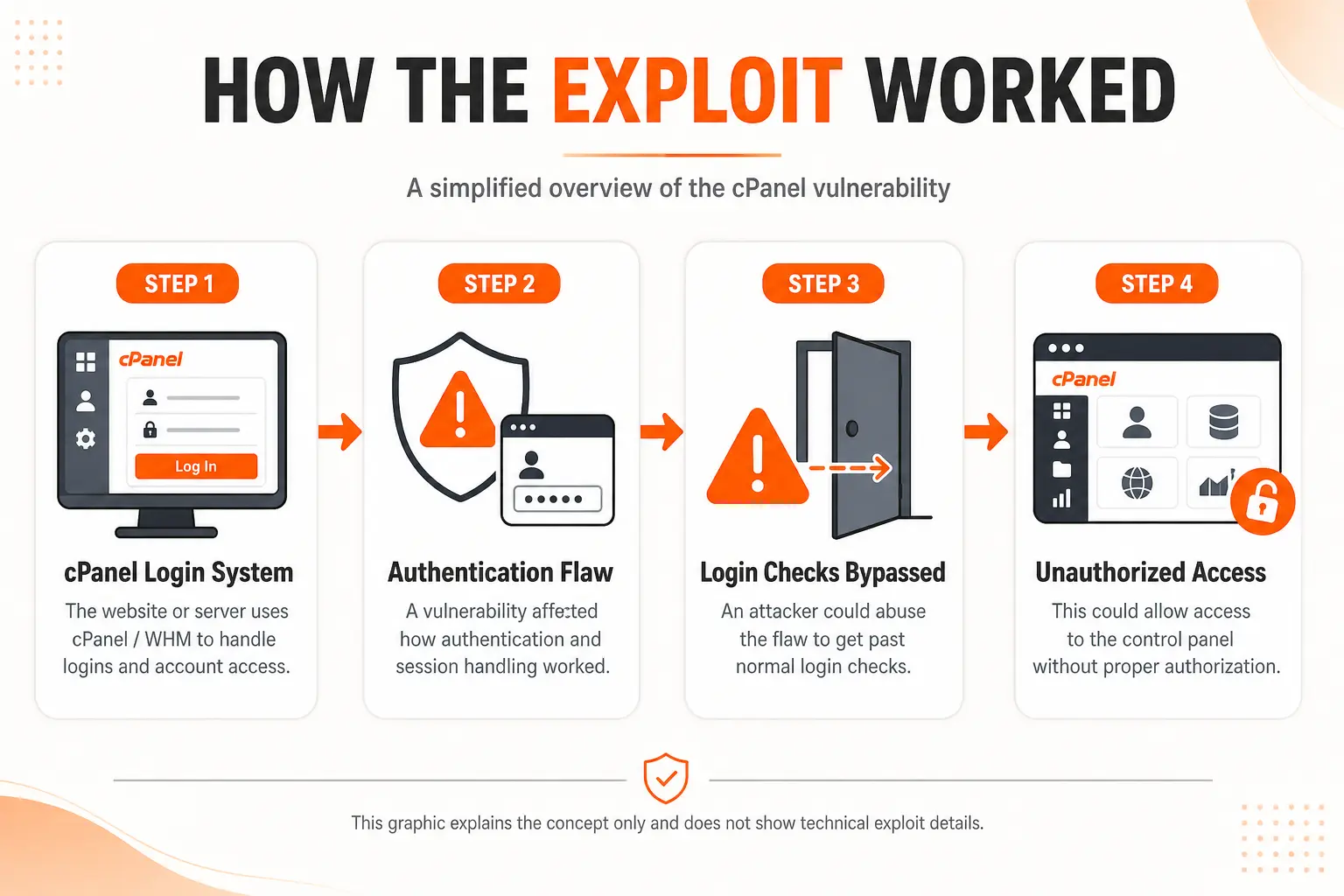
In simple terms, this vulnerability affected the login process of cPanel & WHM.

Normally, to access cPanel or WHM, a user needs valid login details. That means a username, password, and in many cases, additional security checks such as two-factor authentication. This vulnerability created a way for attackers to bypass that normal authentication process under certain conditions.

That is why this type of vulnerability is called an authentication bypass.

An authentication bypass is dangerous because it does not work like a normal password attack. The attacker does not necessarily need to know your password, guess your password, or trick you into giving it away. Instead, the attacker takes advantage of a flaw in how the software handles the login or session process.

Security researchers described CVE-2026-41940 as a critical issue because successful exploitation could allow an unauthenticated remote attacker to gain unauthorized administrative access to affected cPanel & WHM systems. Rapid7 noted that cPanel & WHM provides server-level administration, meaning a successful compromise could affect websites, databases, configurations, and accounts managed through that server.
CVE-2026-41940 How It Happened

Why Was This So Serious?

cPanel and WHM are not just simple website dashboards. They are powerful tools used to manage hosting accounts, websites, email accounts, files, DNS settings, databases, SSL certificates, and server-level configurations.

For a normal website owner, cPanel is often the place where they manage their website files, email accounts, redirects, backups, and databases.

For a server administrator or hosting company, WHM is even more powerful. WHM can manage multiple cPanel accounts on the same server. This means that if an attacker gains high-level access to WHM, the risk can extend beyond one single website.

That is why this vulnerability was treated as urgent across the hosting industry. TechCrunch reported that cPanel & WHM are widely used by hosting companies and website owners around the world, and that the affected software has deep access to the servers it manages.

In practical terms, a successful attack could potentially allow a hacker to interfere with hosted websites, access sensitive files, change configurations, create unauthorized access, or compromise customer accounts on an affected server.

Who Was Affected?

According to cPanel’s advisory, the vulnerability affected cPanel software, including DNSOnly, on versions after 11.40. cPanel released patched versions across multiple supported cPanel & WHM versions and also released a patch for WP Squared.

The main risk applied to servers running affected versions of cPanel & WHM that had not yet been patched.

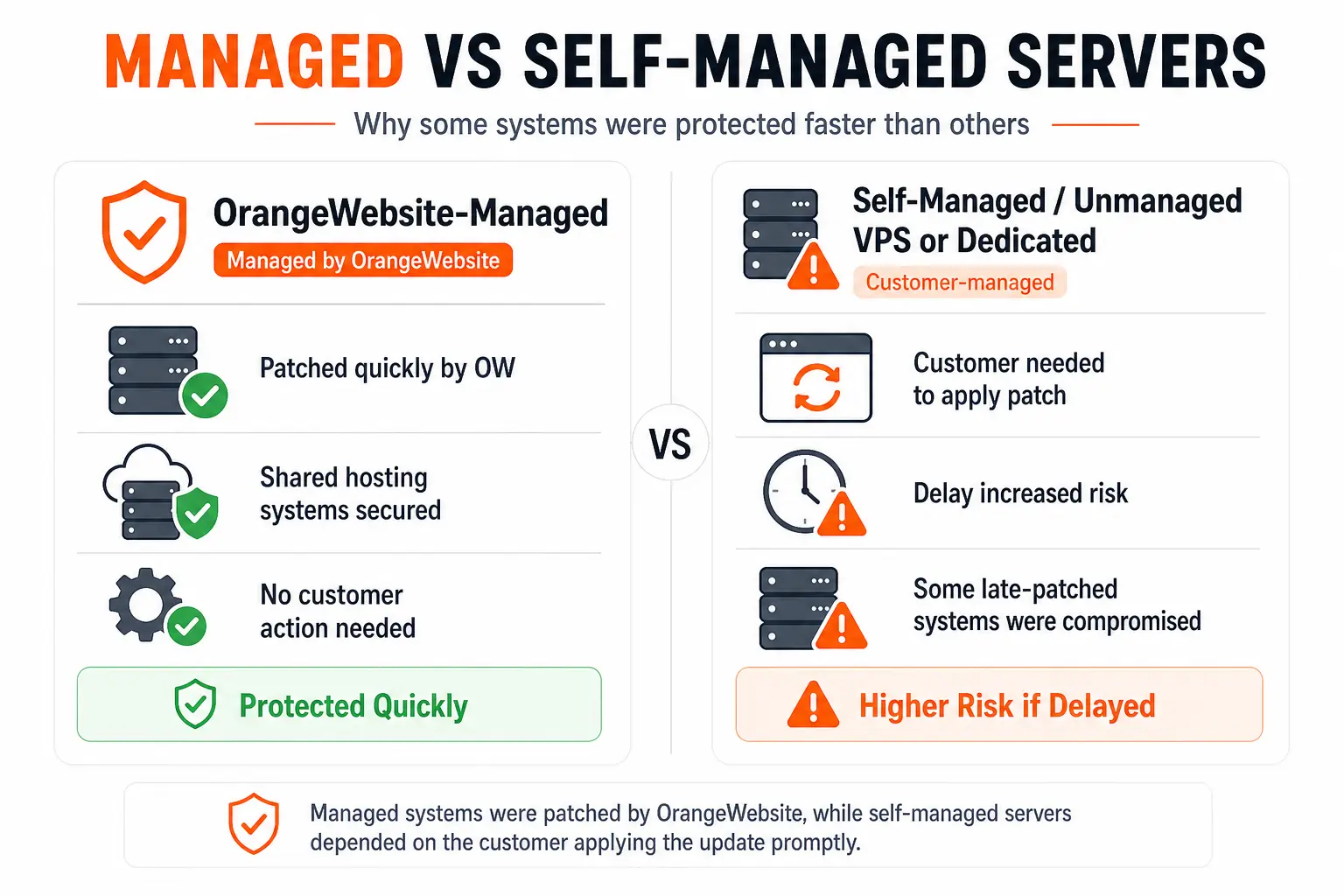
For OrangeWebsite shared hosting customers, we patched the shared hosting environment and system nodes quickly after the disclosure. Customers on fully managed OrangeWebsite infrastructure did not need to manually apply the cPanel update themselves.

However, some customers using their own VPS, dedicated server, or self-managed environment may have needed to apply the patch manually. Unfortunately, some clients who did not apply the patch immediately appear to have been affected by late April 30.

What Did OrangeWebsite Do?

Once the issue was disclosed late on April 28, OrangeWebsite began responding immediately.

Early on April 29, we announced the issue to our clients and started patching all OrangeWebsite-managed machines. This included shared hosting servers and system nodes.

Our priority was to secure our infrastructure as quickly as possible and reduce the risk for customers hosted on OrangeWebsite-managed systems.

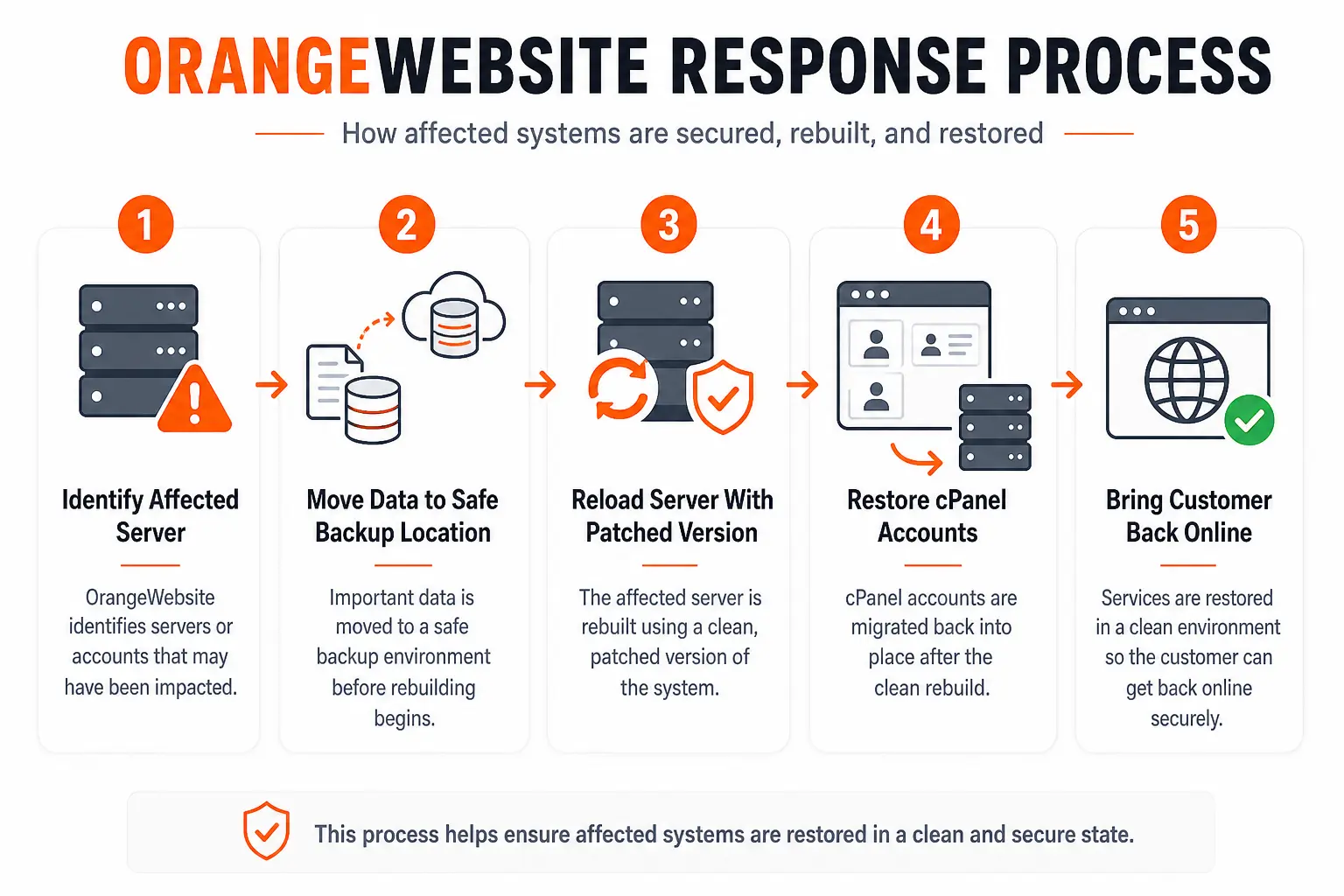
For affected customers, we are also taking additional recovery steps. In cases where a client server appears to have been compromised, we are working directly with the client to migrate their data to a safe backup location while the affected server is reloaded with a clean, patched version. Once the server has been rebuilt and secured, the customer’s cPanel accounts are migrated back into place.

This process is more careful than simply applying a patch after the fact. If a server has already been compromised, patching the vulnerability is only one part of the job. The safer approach is to assume the affected environment may no longer be trustworthy, preserve the customer’s data, rebuild the server cleanly, apply the patched version, and then restore the accounts from a clean source.
CVE-2026-41940 What is OrangeWebsite doing about it

Why Not Just Patch Every Compromised Server and Leave It Online?

This is an important question.

Patching protects against future exploitation of the vulnerability, but it does not automatically remove anything an attacker may have already changed before the patch was applied.

If a server was compromised before being patched, there may be unknown changes on that server. An attacker could have added files, created access methods, changed configurations, or modified accounts. In that situation, simply applying the patch would close the original door, but it would not guarantee that the server was clean.

That is why OrangeWebsite is rebuilding affected servers instead of only patching them in place.

The goal is not just to fix the vulnerability. The goal is to return affected customers to a clean and secure environment.

What Should Customers Do?

If you are an OrangeWebsite shared hosting customer, OrangeWebsite has already patched the shared hosting machines and system nodes under our management.

If you manage your own cPanel server, VPS, or dedicated server, you should make sure your system has been updated to one of the patched cPanel versions. cPanel’s official advisory recommends running the cPanel update script, verifying the installed version, and restarting the cPanel service after the update.

Customers who manage their own servers should also check whether automatic cPanel updates were disabled or pinned to a specific version. cPanel warned that servers with disabled or pinned update settings may not automatically update and should be updated manually as a priority.

If you believe your server may have been compromised, the safest next steps are to contact support, avoid making unnecessary changes, preserve logs where possible, and allow the server to be reviewed properly. In some cases, a clean rebuild and migration may be the most responsible recovery option.
CVE-2026-41940 cPanel Vulnerability Response Process

What Is OrangeWebsite Doing Going Forward?

Security events like this are exactly why fast patching, active monitoring, and proper server management matter.

OrangeWebsite will continue monitoring the situation, assisting affected clients, and rebuilding compromised environments where necessary. We are also continuing to follow official cPanel guidance as new updates and detection methods become available.

cPanel has updated its advisory multiple times since the original publication, including adding patched versions and updating detection guidance.

Our focus is simple: protect customer data, keep websites online where possible, and make sure any affected environment is restored in a clean and secure state.
CVE-2026-41940 cPanel hack difference between managed and self managed servers

How Did the Exploit Happen?

The technical details are complex, but the simple explanation is this:

The vulnerability was connected to how cPanel handled login sessions. A session is what tells the system, “this user has logged in successfully and is allowed to access this area.”

When you log into a website, control panel, or online account, the server usually creates a session for you. That session helps the system remember that you are already logged in, so you do not have to enter your password again on every single page.

In this case, the flaw allowed attackers to interfere with the session process in a way that could make the system treat them as authenticated when they should not have been.

Some technical writeups describe the issue as involving CRLF injection and session handling, but the important point for customers is simpler: attackers found a way to abuse the login/session system to get access without going through the normal login process. Rapid7 described the vulnerability as an authentication bypass caused by a CRLF injection in the login and session loading processes of cPanel & WHM.

This is also why patching was so important. The fix needed to happen at the software level. Changing a website password alone would not fix the underlying vulnerability if the server itself was still running an affected version of cPanel.

Final Thoughts

The CVE-2026-41940 vulnerability was a serious issue because it affected the login and session handling process of one of the most widely used hosting control panels in the world.

For customers, the key thing to understand is that this was not a normal website hack, weak password issue, or WordPress plugin problem. It was a vulnerability in the server control panel software itself.

OrangeWebsite responded quickly by notifying clients, patching managed systems, and working directly with affected customers whose servers were not patched in time. Where compromise is suspected or confirmed, we are taking the safer route: moving customer data to a backup location, rebuilding the affected server with a patched version, and restoring accounts back into a clean environment.

Security issues can move fast, but so can responsible action. In this case, fast patching, transparent communication, and careful recovery are the most important steps toward keeping customers protected.

WordPress Security Tips

WordPress Security Tips

WordPress Website Security

Table of Contents

▼▼▼▼▼

What Is Website Security

How To Secure a Website

Website Maintenance

Security Audits

Website Checklist

Security Solutions

If you run a WordPress website, security isn’t optional anymore. It doesn’t matter if your site is small, new, or “not important enough to be hacked.” Automated attacks don’t care who you are. They scan the internet for weaknesses, and if your site matches one, it gets hit.

To understand how to protect a WordPress site properly, you first need to understand the website security meaning beyond the usual scare tactics. Website security is not a single plugin, a one-time setup, or a checkbox you tick during launch. It’s an ongoing process that combines good decisions, regular maintenance, and awareness of how attacks actually happen.

What Website Security Means for WordPress

Website security, in practical terms, means protecting your site from unauthorised access, data loss, malware infections, spam abuse, and downtime. On WordPress, this protection spans multiple layers: your hosting environment, WordPress core, plugins, themes, user accounts, and even how you manage updates.

Most WordPress security issues don’t come from sophisticated hackers targeting you personally. They come from bots exploiting known vulnerabilities in outdated plugins or poorly configured sites. If your site hasn’t been maintained, it becomes an easy target simply because it’s visible.

Understanding this changes the mindset from fear to prevention. The goal isn’t to make your site “unhackable.” The goal is to remove obvious weaknesses so automated attacks move on to easier targets.

How to Secure Your Website Without Overcomplicating It

One of the biggest mistakes site owners make when learning how to secure their website is overengineering the solution. They install five security plugins, lock down everything, and still get hacked because the basics were ignored.

The most important security practice in WordPress is keeping everything up to date. WordPress core, plugins, and themes are constantly patched to fix vulnerabilities that have already been discovered. Running outdated software is essentially advertising that your site is exploitable.

Strong access control is just as critical. Weak passwords and shared admin accounts remain one of the most common entry points for attackers. Two-factor authentication alone can stop a huge percentage of successful attacks, yet many sites still don’t use it.

Security works best when it’s boring. If your setup is simple, current, and clean, most threats never become problems.

WordPress Website Security Audit

Why Website Security Maintenance Is Non-Negotiable

Website security maintenance is where most WordPress sites fail — not because it’s difficult, but because it’s easy to forget. A site can run perfectly for months or years while quietly becoming more vulnerable with every skipped update.

Maintenance means regularly checking that your site is still configured the way you think it is. Plugins get abandoned. Hosting environments change. PHP versions update. New users get added and forgotten. Any one of these can introduce risk.

A well-maintained WordPress site doesn’t need constant attention, but it does need routine check-ins. Even ten minutes a week can prevent issues that would otherwise turn into hours of cleanup later.

Wordpress Website Security Maintenance

Website Security Audits: Catching Problems Early

A website security audit is not just for hacked sites. In fact, audits are most valuable when nothing appears to be wrong.

An audit looks at your WordPress site from the perspective of an attacker. It checks whether your core files are intact, whether plugins are introducing risk, whether user roles make sense, and whether your site is exposing information it shouldn’t. Many security issues sit unnoticed until something breaks, and by then the damage is already done.

For business websites, security audits should be done regularly, especially after migrations, major updates, or long periods without maintenance. They act as a reset button, ensuring your site hasn’t quietly drifted into unsafe territory.

WordPress Website Security Audit

Using a Website Security Checklist the Right Way

A website security checklist is useful, but only when it’s treated as a reference, not a replacement for understanding. Checking boxes without knowing why they matter often leads to false confidence.

The purpose of a checklist is consistency. It ensures that updates are applied, backups are running, and security measures haven’t been disabled over time. When paired with proper knowledge, a checklist helps you maintain security long after the initial setup is complete.

If your checklist never changes, that’s a red flag. Security evolves, and so should the way you review your site.

WordPress Website Security Checklist

Common Website Security Issues and Real Solutions

Most WordPress security problems fall into a small number of predictable categories. Malware infections usually come from outdated or pirated plugins. Brute-force attacks succeed because of weak login protection. Data loss happens because backups weren’t tested.

The solution to these issues is rarely a single tool. It’s a combination of prevention, monitoring, and response. Clean backups matter as much as firewalls. Awareness matters as much as automation.

The sites that recover quickly from security issues aren’t the ones with the most plugins — they’re the ones that understood their setup before something went wrong.

WordPress Website Security Threats and Solutions
The Rise in Virtual Assistants

The Rise in Virtual Assistants

The Growth of Digital & Virtual Assistants

They are referred to by various names including digital assistants, virtual assistants, voice assistants, and most recently smart speakers. Odds are you or someone you know has or soon will have one in their home. You may already use one on your phone. It is another in a series of digital advances designed to either make your life more convenient, find out more about you or potentially both.

Rather than having to undergo pesky typing into a digital device, users can simply make their request by speaking out loud into or at least near enough to the device so it can “hear”. They are in smartphones, televisions, computers, and in our automobiles. While this article will begin with a general look at the technology involved, we will ultimately focus on in-home voice speakers and their amazing growth in popularity in recent years.

 The History of Speech Recognition

Many don't realize how long speech recognition technology has been around. Bell Laboratories introduced it with a simple " Audrey " device in 1952. Audrey could recognize numbers spoken by one voice. In 1962, IBM introduced the "Shoebox" that could identify 16 English words. Slowly, speech recognition improved through the 1960s, when it included more vowels and consonants in various languages.

In the early to mid-1970s, the United States Defense Department got involved, and the technology made great strides. "Harpy" resulted in a system that could mimic the vocabulary of the average three-year-old. Eventually, Bell Labs introduced a system that could recognize multiple voices.

Subsequent advances in voice recognition were accomplished through predictive voice recognition, where words were recognized based on speech patterns. In 1987, a doll named Julie could mimic speech and was marketed as "...the doll that understands you." If that sounds creepy, consider what we place in our homes today.

In the 1990s, voice recognition became more available for consumers as computer speeds advanced. It was often cumbersome, however, and software frequently had to be trained to the user's voice. Systems were frustrating due to misunderstandings between the users and the software. Early phone editions were particularly aggravating as callers would have to repeat themselves incessantly to get the software to "understand" what they wanted.

With the growing popularity of the Internet, Google helped the technology take a huge step forward with its Google Voice Search App for the iPhone in the 2000s.

Another milestone in the development of voice assistants was in 2011 when IBM's "Watson" appeared on Television's "Jeopardy" program and Apple introduced Siri. Microsoft responded with Cortana in 2013; in late 2014, Amazon introduced Alexa and The Echo. The Assistant from Google debuted in 2016, as did the Echo Dot. Later that year, Google Home was launched.

The Growth of Voice Speakers in the Home

So, here we are now, over 65 years after Audrey recognized spoken numbers and 55 years after Shoebox was demonstrated at the World's Fair. Everybody, from doll makers to the US Department of Defense, has shown interest through that time. It has been employed in our phones and our cars. However, depending on your perspective, it is reaching a new level of convenience and voluntary intrusion.

Estimates are there are about 30 million Google Home and Amazon Echo voice speakers in American homes. Penetration is expected to reach 55% within the next four years. A growing number of companies like Lenovo, LG, Harmon Kardon, and even toy maker Mattel have set out to grab a share of this rapidly growing market. What's behind this growth, how is it impacting us, and what is next?

Convenience Trumps Privacy

Voice speakers, or as some are now calling AI voice speakers, are another example that people are willing to trade personal information and privacy for convenience and will pay for the privilege. Convenience is king; technology-based companies like Amazon and Google fully understand that. It also affords them something even more valuable than just the sales of these devices. These tech companies' real value is their consumer data and insights.

It is not unlike the sales of cheap printers in the 1990s and early 2000s. Affordable printer prices and convenience lured in consumers. They may not have been aware of the expensive replacement cartridges that awaited them. Companies promoting voice speakers may be making these devices more and more affordable to gain access and insight into consumer behaviour and information.

What This Means for Marketers

So, if all of this history and growth in voice recognition and, ultimately, AI voice speakers are interesting, what are the practical aspects for those with websites who want to sell more of their products and services? It starts with understanding that many of these activities are search-related. "Alexa, find me a local rock and roll radio station.", "Siri, who has the best pizza near us?" or "Google, what is tomorrow's weather going to be?" are basic searches initiated by voice rather than typing.

There are already over one billion searches conducted by voice every month. By 2020, just two years from now, it is predicted about a third of all searches will be performed without a screen. More and more people are joining the voice search option and feeling more comfortable with it, including those using voice speakers. This may help you craft verbally friendly SEO efforts along with written keyword strategies.

Why You Should Choose Orange Website

OrangeWebsite.com is an Icelandic-based web hosting solutions provider committed to the growth of our customers. We are in an internet-friendly country that respects the privacy of internet users. We provide hosting plans that can be paid through private secure and private payment options like Bitcoin and cash through the mail. Learn more by visiting OranageWebsite.com and get started today.

The Trouble with Let’s Encrypt

The Trouble with Let’s Encrypt

The Trouble With Lets Encrypt

Lets Encrypt Free SSL

Lets Encrypt Free SSL

SSL certificates all perform the same task, but they aren't all equal in quality. Let's Encrypt issues certificates that are free of cost and easy to install, with the aim of making secure Web connections as universal as possible. The downside of this approach is that its certificates don't offer much confidence in their authenticity. At OrangeWebsite, we've decided not to accept them on our shared hosting, though you can use them on a VPS or dedicated server. We'd like to let you know our reasons.

Not all SSL certificates are the same

Having an SSL certificate provides an encrypted connection between a browser and a Web server. The protocol family that supports this is widely known as SSL, but current versions are more properly called TLS. Connecting by TLS guarantees that the server belongs to the owner of the certificate. A certificate authority (CA) digitally signs the certificate, indicating it has confirmed its authenticity.

Anyone can create a self-signed certificate. It will enable encrypted connections, but without a CA's signature, there's no guarantee that the site owner is who it claims it is. Browsers warn users against trusting self-signed certificates.

Let's Encrypt acts as a “free, automated, and open certificate authority.” It allows anyone to set up a secure website at no cost and with little effort. This is good, but prominent figures in the tech industry have expressed serious concerns about its certificates.

The process for setting up a certificate is simple. A couple of commands on a Linux server will do the whole job. The problem is with the level of authentication provided. The only validation is that the applicant for the certificate controls the domain it's issued to. If you're getting a certificate for example.com, you have to register it from example.com. There's no checking who you are. This type is known as a “domain validated” certificate. Let's Encrypt isn't the only CA to issue domain validated certificates, but it's the only one that doesn't charge anything for them.

Certificates and trust

Just having an SSL certificate, especially one that's only domain validated, doesn't make a site trustworthy. It could be a near-lookalike for a well-known domain (e.g., micros0ft.com). Let's Encrypt has reportedly issued over 14,000 certificates to domains that impersonate PayPal.

Some domains allow users control of subdomains (e.g., mydomain.example.com). They can obtain certificates for their subdomains. This can give the impression of approval by a well-known site. The subdomain may redirect to a different domain, on an independent server which the primary domain has no control over.

The most trustworthy SSL certificates are EV certificates. EV stands for “extended validation” and signifies that the CA has met certain standards for checking the applicant's identity. It has checked and confirmed that the applying organization legally exists and is who it claims to be. Browsers generally indicate an EV certificate with a green symbol, such as a padlock.

Unfortunately, most people don't recognize the nuances. If they see a padlock, they're likely to assume the site is trustworthy. Since Let's Encrypt doesn't even require a payment method, its bar to registering a certificate is very low. It plans to check the Google Safe Browsing API for known phishing or malware sites, but that's about the extent of its checking. There have been confirmed reports of malvertisers using its certificates. When certificates are free, it's easy to set them up with throwaway domains.

We hope that in time, Internet users will better understand the difference between a secure site and a legitimate one. When the large majority of sites display a padlock in the address bar, browsers will need to make a clearer distinction among the levels of validation. Eventually they may warn users about sites whose certificates are only domain validated. If a browser did that today, though, it would have to issue a constant stream of warnings.

For the present, it's a good habit to click on the padlock symbol of a secure site if there's any doubt about it. The browser should give information about the site's level of validation and its owner of record. Some browsers, though, will say nothing more than “This site is secure.”

Openness and trust

Let's Encrypt has explained its policy. It argues that a CA is in a poor position to police a site's content. It's difficult to determine if a site is clean, and harder to check if it stays clean. The primary aim of the project is to make as much of the Web as possible use TLS. That will inevitably include rogue websites. These sites exist anyway; the only difference is that some people may trust them more when they see the padlock symbol.

Any issuer of domain validated certificates faces this risk, and even the EV level isn’t completely safe against malicious sites. A signed certificate isn't and can't be proof of trustworthiness. Let's Encrypt doesn't want to take on the role of a censor, and we appreciate that. At the same time, we don't want to give dishonest websites the appearance of legitimacy if we can avoid it.

We offer several options for purchasing SSL certificates. The lowest priced ones are domain validated, but the annual fee will discourage acquiring certificates for throwaway domains. For a better level of validation, we offer the Comodo InstantSSL certificate with business-level validation. The best validation comes with our Comodo EV certificates, either for a single domain or for multiple domains sharing the same IP address.

Balancing trust and openness can require some difficult tradeoffs. One of our chief goals is to enable free expression, but we don't want to be a magnet for deceptive and dangerous sites. We hope you understand the reasons for our choice. Feel free to contact us with any questions.

Stop! Thief! Online Identity Theft

Stop! Thief! Online Identity Theft

Stop! Thief! Online Identity Theft

Online Identity Theft

How Your Identity is Being Stolen

If you've had your identity stolen, you know the problems it can cause. Even a simple unauthorized use of a credit or debit card can cost you hours of frustration, sometimes tying up needed funds. The U.S. Department of Justice says about 18 million people per year are victims of at least some form of identity theft. While many of these thefts are conducted on a massive scale, others are much more targeted.

We may imagine that these hackers are sophisticated technological wonder kids or that they originate from Nigeria, but often, the story is much closer to home and individualized. In some cases, it's not all that complicated. In a recent highly publicized case, hackers obtained confidential data through a server using a default "admin" username and password that was never changed.

Stopping identity theft takes understanding how thieves are getting your information from you.

Data Theft from Large Companies

This is the most publicized area of identity theft because it affects so many people and is out of our control. Data breaches have occurred at companies ranging from retail stores to the recent breach at a major credit reporting agency. To conduct commerce today, we must be connected digitally, and these consumer-oriented companies need to verify identities. This means our personal information is stored on massive servers that are available to authorized employees and management, potentially to their technical contractors, and, of course, hackers.

Skimmers

If you've ever used a credit or debit card at a fuel pump, grocery store, retail store, ATM or elsewhere, you may have been susceptible to a card skimmer. These skimmers or "card readers" commonly fit over the original card strip or insert without impairing the transaction. The skimmers read the data from your card's magnetic strip and either store them to be retrieved by the thieves or digitally send them to a nearby device. In some cases, cameras are attached to or near them to see the PIN you have entered. Some skimmers use pads that fit over the original keypad of the device to gain your pin.

While credit card chips are designed to limit this theft, many chipped cards still contain a strip to make them versatile enough to use in non-chipped machines. While skimmers may be challenging to detect, inspect any credit card machine closely before use and attempt to move the cardholder to see if it is the original. Cover one hand with the other when entering your PIN, and make sure no one is looking over your shoulder.

Phishing

Phishing is one of the original forms of identity theft in the digital age, although today, it is more sophisticated than ever. Phishing usually involves the thief sending out many bulk or spam emails, "phishing" for a bite. These emails may urge you to update your personal information and direct you to a fake website where you are encouraged to input your personal information voluntarily. These faux websites may even include the company name in the URL and are often designed to mimic a company's original website closely. Phishing tactics may also claim you have an inheritance, won a contest or offer some other financial incentive to get your personal information.

Vishing

Vishing is essentially voice phishing using the telephone. The caller often poses as a bank or credit card company representative and uses suspected identity theft as the purpose of the call. They will ask you to verify your personal information. Instead, call your bank or credit card directly and ask if your data has been compromised.

Social Media and Internet Searches

There is already much data about you available on the internet without adding to the problem voluntarily on social media. Many users commonly display their birth dates, emails, places of work, education, work experience, and even phone numbers and addresses online. They can easily pose as "friends" to get more information. If you use social media, be careful of what data you make available and ensure that only invited friends can access your profile.

Handing Your Credit Card to Someone Else

When you hand your credit card to a server at a restaurant, a clerk at a hotel, or even let a family member borrow it, you increase the odds of identity theft. The front and back can be quickly and discretely photographed, videoed or copied for unauthorized use. New cards can be created from the data on your magnetic strip; all it takes is a simple card reader that can be plugged into any computer.

Trash

If you don't have a paper shredder, get one and use it. Many identity thefts come from your trash that contains personal mail and account data from banks, credit cards, and even tax forms. A credit card statement alone contains a wealth of information that can lead to problems when combined with just a few more pieces of information. Pre-approved credit card offers are a must-shred item.

Regular, Old Fashioned, Theft

When you realize how much personal information is in your wallet, cellphone, and even your car's glove compartment, you will take better steps to protect it. Protecting your cash and credit cards isn't enough today. Not when thieves will find your personal information just as, if not more, valuable. Always know where your phone, wallet, and personal information are located.

Conclusion

Being careful about identity theft is not paranoia. It is prudent. Be cautious about how and where you share your data, including cell phone calls in public places. Ensure you only share information on websites with a secure Hypertext Transfer Protocol Secure (HTTPS) address that designates your information to be encrypted. If you conduct e-commerce on a website, ensure you protect your customer's information safely with encryption. Be cautious and minimize your risk of identity theft.

What Is Two Factor Authentication (2FA)

What Is Two Factor Authentication (2FA)

What Is Two Factor Authentication (2FA)

two factor authentication 2fa

What Is Two Factor Authentication (2FA), And How Does It Benefit Companies?

Identity theft, hacking, and phishing attacks are all on the rise and cost individuals and businesses billions each year. A successful hacking attack typically costs the businesses that are its victims more than money. There is the additional expense, more challenging to quantify, of a damaged reputation as customers lose confidence in the company's ability to keep their data private and secure.

The Impact of Hacking Attacks on Business

According to a recent study by Lloyd’s of London, global hacking attacks cost businesses more than $400 billion each year. Those costs are multiplied by the expensive measures companies take to ensure the security of their data. For example, companies spend more than $75 billion each year on cybersecurity.

Small Businesses Are Not Safe From Hacking 

Until recently, those attacks were targeted primarily against multi-national corporations, but increasingly, cybercriminals are going after small businesses.  In 2013, 44% of small businesses reported at least one hacking attack, according to the National Small Business Association.  While large corporations can absorb the losses associated with a hacking or phishing attack, for small businesses, such attacks can be devastating regarding financial losses and damage to their reputation.

Identity Theft Affects Millions and Is Increasing Every Year

Cybercrimes affect not only businesses. According to the US Bureau of Justice, more than 17 million individuals were victims of identity theft in 2014, mainly through the hacking of their credit or debit card accounts. According to Business Insider, identity theft cost individuals almost $25 billion in 2013, $10 billion more than property theft.

The increase in recent years of hacking attacks on businesses and identity theft aimed at individuals has caused many companies to wonder if they can do anything to protect their data. Fortunately, there is a way for businesses to protect the privacy of their customers and the security of their personal information.

What Is Two Factor Authentication (2FA)?

Two-factor authentication, the latest advancement in information security systems, makes it more difficult for thieves to access customer data. Most security systems require customers to verify their identity by providing a password and User ID.

Two-factor authentication provides an added layer of security by requiring system users to enter additional information that only the user has, such as something only the user knows, like a PIN or answer to a security question; something they have in their possession, like a mobile phone or ID card; or a physical characteristic, like their fingerprint or voice.

Experts Agree:  Two Factor Authentication Protects Data Better

Following the 2013 hacking attack on the Saudi oil giant Saudi Aramco on Twitter. Experts agreed that it was time for Twitter to join other social media sites like Google in implementing two-factor authentication.  In an article with the title, “Following breaches, experts call for two-factor authentication on Twitter,” Chester Wisniewski, a senior security adviser for the security firm Sophos, wrote:

“It is high time Twitter implement something to augment account security. Two-factor authentication would be a great option for protecting high-profile brands, celebrities and those who simply want that extra layer of security for their online identity.”

The Benefits of Two-Factor Authentication

Two-factor authentication is relatively inexpensive to implement and offers several important benefits to help businesses protect the security of their data. Here are 4 of the most important benefits of two-factor authentication:

Improved security:  passwords and user ID numbers are relatively easy for cyber thieves to access.  Many people, for example, are afraid of forgetting their passwords and writing them down in one or more places thieves can find.  Two-factor authentication makes it more difficult for thieves to steal customer data with features such as one-time passwords (OTPs), suitable for only one login, information only the user has, or personal characteristics like fingerprints, which thieves can’t duplicate.

Increased worker productivity: Because two-factor authentication makes data more secure, companies are more confident about permitting their employees to work remotely. According to the Harvard Business Review, when the Chinese travel website Ctrip allowed its employees to work remotely from home, their productivity increased on average by more than 13%, and the company saved almost $2,000 per employee while also improving employee retention.

Reduced operating costs:  two factor authentication makes businesses more efficient and reduces operating costs.  For example, because there are fewer password resets, customers don’t need to call help desks as frequently.  In addition, companies spend less time contacting customers about suspicious activity on their accounts.  Finally, companies spend less money on expensive fraud review systems.

Customer satisfaction: Customers are naturally attracted to businesses that are better able to secure their data. When they see that a business requires additional security information, they feel protected and feel more positively about that business for ensuring their information is secure. Those positive feelings add to customer trust and boost customer retention.

Conclusion

Companies that fail to protect their customers' personal information lose money and reputation. For smaller businesses, those losses can be catastrophic. Fortunately, forward-thinking web hosting providers have developed innovative approaches to helping businesses with their data and privacy concerns. 

Founded in 2006, OrangeWebsite is a recognized industry leader in providing safe and secure web hosting services. Our two-factor authentication service includes a special one-time passcode sent to users through SMS, which users submit to ensure a secure login. The annual fee is just €94.

If you would like to know more about how we can make your website safer and more secure or about our two-factor authentication services, contact us today.